Updating


iPhone Screenshots


iPad Screenshots



Description
The Bridgemate® app is a personal add-on to the existing Bridgemate Pro or Bridgemate II scoring system for bridge clubs. It enables players during or directly after the bridge game to review their scores, rankings and competitors’ scores for the boards that they have just played. Since version 3, it is also possible to enter scores through the app. It also offers an interactive analysis tool to provide educative feedback on your play. Clubs that use the Bridgemate scoring system can upload the Bridgemate scores and other data during their event from the Bridgemate Control Software, and this information is displayed in real time in the app on the player’s smartphone.
The Bridgemate app offers an extensive range of information for players:
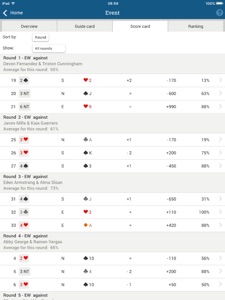
- A guide card for the current event. Find out who your opponents will be during the event.
- Your personal scorecard. This is updated in real time, and the results are updated as soon as new scores come in.
- Current rankings are displayed for the section in which you’re playing.
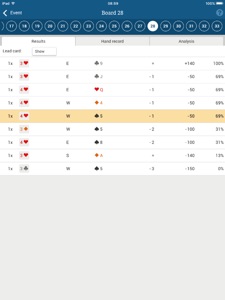
- An overview of your competitors’ scores can be displayed for each board played.
- If hand records are available, they are displayed in the app along with makeable contract information.
- An interactive analysis of the boards you’ve just played. For each possible card you could have played, the app tells you how this would have affected your board result.
- Extensive functionality for tournament directors (both playing and non-playing) to keep track of the session. Combined with the latest Bridgemate II updates, it is also possible to receive TD calls within the Bridgemate app.
- Register attendance at a current event. (choose your starting table and direction)
- Enter scores in the app.
The Bridgemate app is an individual service for players who participate in bridge games that use the Bridgemate scoring system. In order to use the Bridgemate app in a bridge game, the organiser of the game (i.e. the bridge club) is required to create a club account on the Bridgemate website and upload the event data in real time via the Bridgemate Control Software. Clubs control which information is visible in the app during the game. Before using this app, consult with your bridge club about whether it uploads data in this way.
What's New in Version 3.5.2
New in version 3.5.2:
- In-app purchase experience is improved
- Bug fixes and performance improvement
Seller
Name
Bridge Systems BV
Information
Developer
Categories
Version
3.5.2
Size
62.2 MB
Game Center
No
VPP Device Licensing
Yes
Rating
Rated: 4+
Compatibility
iOS 12.0 or later
Devices
iPhone 5s, iPhone 6, iPhone 6 Plus, iPhone 6s, iPhone 6s Plus, iPhone SE, iPhone 7, iPhone 7 Plus, iPhone 8, iPhone 8 Plus, iPhone X, iPhone XR, iPhone XS, iPhone XS Max, iPhone 11, iPhone 11 Pro, iPhone 11 Pro Max, iPhone SE (2nd generation), iPhone 12, iPhone 12 Pro, iPhone 12 Pro Max, iPhone 12 mini, iPhone 13, iPhone 13 Pro, iPhone 13 Pro Max, iPhone 13 mini, iPhone SE (3rd generation), iPhone 14, iPhone 14 Plus, iPhone 14 Pro, iPhone 14 Pro Max, iPhone 15, iPhone 15 Plus, iPhone 15 Pro, iPhone 15 Pro Max, iPhone 16, iPhone 16Plus, iPhone 16Pro, iPhone 16ProMax, iPhone 16e, iPad (5th Generation) Wi-Fi, iPad (5th Generation) Wi-Fi + Cellular, iPad (6th generation) Wi-Fi, iPad (6th generation) Wi-Fi + Cellular, iPad Pro, iPad Pro (Cellular), iPad Pro (9.7-inch), iPad Pro (9.7-inch) (Cellular), iPad Pro 12.9-inch (2nd generation), iPad Pro 12.9-inch (2nd generation) Wi-Fi + Cellular, iPad Pro (10.5-inch), iPad Pro (10.5-inch) Wi-Fi + Cellular, iPad Pro (11-inch), iPad Pro (11-inch) Wi-Fi + Cellular, iPad Pro 12.9-inch (3rd generation), iPad Pro 12.9-inch (3rd generation) Wi-Fi + Cellular, iPad Air, iPad Air (Cellular), iPad Air 2, iPad Air 2 (Cellular), iPad Air (3rd generation), iPad Air (3rd generation) Wi-Fi + Cellular, iPad mini Retina, iPad mini Retina (Cellular), iPad mini 3, iPad mini 3 (Cellular), iPad mini 4, iPad mini 4 (Cellular), iPad mini (5th Generation), iPad mini (5th Generation) Wi-Fi + Cellular, iPad (7th generation) Wi-Fi + Cellular, iPad Pro 11-inch (2nd generation), iPad Pro 11-inch (2nd generation) Wi-Fi + Cellular, iPad Pro 12.9-inch (4th generation), iPad Pro 12.9-inch (4th generation) Wi-Fi + Cellular, iPad Air (4th Generation) (Wi-Fi), iPad Air (4th Generation) (Wi-Fi + Cellular), iPad (8th generation) Wi-Fi, iPad (8th generation) Wi-Fi + Cellular, iPad Pro 11-inch (3rd generation), iPad Pro 11-inch (3rd generation) Wi-Fi + Cellular, iPad Pro 12.9-inch (5th Generation), iPad Pro 12.9-inch (5th Generation) Wi-Fi + Cellular, iPad (9th Generation), iPad (9th Generation) Wi-Fi + Cellular, iPad mini (6th Generation), iPad mini (6th Generation) Wi-Fi + Cellular, iPad Air (5th generation), iPad Air (5th generation) Wi-Fi + Cellular, iPad Pro 11-inch (4th generation), iPad Pro 11-inch (4th generation) Wi-Fi + Cellular, iPad Pro 12.9-inch (6th generation), iPad Pro 12.9-inch (6th generation) Wi-Fi + Cellular, iPad (10th generation), iPad (10th generation) Wi-Fi + Cellular, iPad Air 11-inch (M2) Wi-Fi, iPad Air 13-inch (M2) Wi-Fi, iPad Air 13-inch (M2) Wi-Fi + Cellular, iPad Pro 11-inch (M4) Wi-Fi, iPad Pro 11-inch (M4) Wi-Fi + Cellular, iPad Pro 13-inch (M4) Wi-Fi, iPad Pro 13-inch (M4) Wi-Fi + Cellular, iPad A16, iPad A16Cellular, iPad Air11M3, iPad Air11M3Cellular, iPad Air13M3, iPad Air13M3Cellular, iPad MiniA17Pro, iPad MiniA17ProCellular, iPod touch (6th Generation), iPod touch (7th generation)
Languages
English, Dutch, French, German, Greek, Italian, Norwegian Bokmål, Turkish
App Store: Customer Ratings
Ratings & Reviews
5.0 of 5 (2 Ratings)
App Store: Customer Reviews
No Entry