Updating


iPhone Screenshots


iPad Screenshots


Description
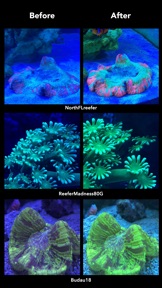
LED aquarium lights are brilliant, but blue (actinic) light interferes with your camera sensor, changing the beautiful colors of your fish and corals into a scene from a black light filled roller rink from the 1980's.
Enter our hopeful hero, Aquarium Camera. It dreams of ridding the internet of bad aquarium photography. It's designed to color correct the actinic light from LEDs in real-time on our mobile devices, the thing we use to take photos of everything else in our lives, except our tanks... until now.
"The Aquarium Camera app is an essential tool for reef tank photography." – ReefBuilders.com
You can now stop buying pro camera rigs, shooting in raw, buying gels, and turning off your blue lights to get great and accurate shots of your tank. You don't need to spend hours in post-production or photo editing apps, tweaking the hue and lighting of each of your photos. Simply put, all you need is the Aquarium Camera and an iPad or iPhone to get GREAT photos and videos of your aquarium.
“So easy to use… Love it!!! And the color changing is realtime so you can see the screen and the real thing side by side to ensure you get the right balance.”
– Carlos Chacon, IT Manager at CoralVue
Features:
• Real-time white balance color
• Real-time RGB adjustment
• *NEW* Real-time Gel mode - orange gels are typically used by professional photographers to compensate for blue light. The new gel mode works like magic by simulating what a gel over your lens will do to your shots. It goes a step further by dynamically changing it's color based on what it sees in your shot (it's like buying millions of gels and picking just the right one for each shot)
• Take Photos or Video
• Portrait and Landscape photos (obviously)
• Digital pinch to zoom
• Touch to focus
• Manually control brightness
• Toggle the flash on/off (works great if your corals are really close to the glass in your aquarium)
• Download it one time and use on your iPad and iPhone
• Quickly access your camera roll to review shots
• Share photos or videos right from the library
Special thanks to the members of Reef2Reef.com for testing version 3.0 of the app! Over 250 aquarists tested version 3.0 prior to pushing to the app store. Check out the Reef2Reef, ReefCentral, Nano-Reef and ChicagoReefs forums to see some of their awesome aquarium photos! Super big thanks to Reef2Reef members Jason Mack, Scott Nelson, Scurvy, NorthFLreefer, ReeferMadness80G, Budau18 and Stratru362 for giving me permission to use their photos in the preview!
I created the Aquarium Camera app because I was tired of seeing posts of brilliant aquariums on forums like Reef2Reef, Nano-Reef, ReefCentral that don't truly represent the health and beauty of the fish, plants, and corals inside. It wasn't as big of a problem in the days of VHO, Power Compacts and Metal Halide lighting, but with LEDs now taking over the aquarium lighting space, we needed another solution.
Let's commit ourselves to spending less time trying to correct the lighting on our aquarium photos and videos and more time enjoying our fish, shrimp, snails, plants, and corals... oh, and doing water changes.
The before and after shots in the preview were taken at the 2017 Aquatic Experience Kessil booth, A80 Tuna Blues. The video was taken under an AquaIllumination Nano LED fixture.
What's New in Version 3.1
This app has been updated by Apple to display the Apple Watch app icon.
3.0 - Checkout the all new Gel mode! It simulates the placement of a colored lens over your camera. Before making the Aquarium Camera app, buying a lens or colored gel (typically orange) was pretty much the only way you could reliably get blue light out of your aquarium shots. The thing that I think makes this app even superior to that life hack , is that it dynamically changes the color of the lens to match what the camera sees in the scene. You might have a frag that needs more yellow, or lighter orange, or more red. Another shot of that mother acro colony might actually need a lens with a bit more blueness to it. It's like you went out and bought 16,777,216 pack of gels (give or take) so you could get the perfect color correction every time. I also added in some auto controls on the sliders to get you back to par if you went a little too nuts. You can now see the values changing dynamically and get a readout of their values. This version also fixes a few users experiencing crashes with the new iPhone X.
3.1 - Includes bug fixes (classic liverock hitchhiker type of stuff) and minor enhancements
Seller
Name
John Ostler
Information
Developer
Categories
Version
3.1
Size
3.6 MB
Game Center
No
VPP Device Licensing
Yes
Rating
Rated: 4+
Compatibility
iOS 10.0 or later
Devices
iPhone 5, iPhone 5c, iPhone 5s, iPhone 6, iPhone 6 Plus, iPhone 6s, iPhone 6s Plus, iPhone SE, iPhone 7, iPhone 7 Plus, iPhone 8, iPhone 8 Plus, iPhone X, iPhone XR, iPhone XS, iPhone XS Max, iPhone 11, iPhone 11 Pro, iPhone 11 Pro Max, iPhone SE (2nd generation), iPhone 12, iPhone 12 Pro, iPhone 12 Pro Max, iPhone 12 mini, iPhone 13, iPhone 13 Pro, iPhone 13 Pro Max, iPhone 13 mini, iPhone SE (3rd generation), iPhone 14, iPhone 14 Plus, iPhone 14 Pro, iPhone 14 Pro Max, iPhone 15, iPhone 15 Plus, iPhone 15 Pro, iPhone 15 Pro Max, iPad (4th Generation) (Wi-Fi), iPad (4th Generation) (4G), iPad (5th Generation) Wi-Fi, iPad (5th Generation) Wi-Fi + Cellular, iPad (6th generation) Wi-Fi, iPad (6th generation) Wi-Fi + Cellular, iPad Pro, iPad Pro (Cellular), iPad Pro (9.7-inch), iPad Pro (9.7-inch) (Cellular), iPad Pro 12.9-inch (2nd generation), iPad Pro 12.9-inch (2nd generation) Wi-Fi + Cellular, iPad Pro (10.5-inch), iPad Pro (10.5-inch) Wi-Fi + Cellular, iPad Pro (11-inch), iPad Pro (11-inch) Wi-Fi + Cellular, iPad Pro 12.9-inch (3rd generation), iPad Pro 12.9-inch (3rd generation) Wi-Fi + Cellular, iPad Air, iPad Air (Cellular), iPad Air 2, iPad Air 2 (Cellular), iPad Air (3rd generation), iPad Air (3rd generation) Wi-Fi + Cellular, iPad mini Retina, iPad mini Retina (Cellular), iPad mini 3, iPad mini 3 (Cellular), iPad mini 4, iPad mini 4 (Cellular), iPad mini (5th Generation), iPad mini (5th Generation) Wi-Fi + Cellular, iPad (7th generation) Wi-Fi + Cellular, iPad Pro 11-inch (2nd generation), iPad Pro 11-inch (2nd generation) Wi-Fi + Cellular, iPad Pro 12.9-inch (4th generation), iPad Pro 12.9-inch (4th generation) Wi-Fi + Cellular, iPad Air (4th Generation) (Wi-Fi), iPad Air (4th Generation) (Wi-Fi + Cellular), iPad (8th generation) Wi-Fi, iPad (8th generation) Wi-Fi + Cellular, iPad Pro 11-inch (3rd generation), iPad Pro 11-inch (3rd generation) Wi-Fi + Cellular, iPad Pro 12.9-inch (5th Generation), iPad Pro 12.9-inch (5th Generation) Wi-Fi + Cellular, iPad (9th Generation), iPad (9th Generation) Wi-Fi + Cellular, iPad mini (6th Generation), iPad mini (6th Generation) Wi-Fi + Cellular, iPad Air (5th generation), iPad Air (5th generation) Wi-Fi + Cellular, iPad Pro 11-inch (4th generation), iPad Pro 11-inch (4th generation) Wi-Fi + Cellular, iPad Pro 12.9-inch (6th generation), iPad Pro 12.9-inch (6th generation) Wi-Fi + Cellular, iPad (10th generation), iPad (10th generation) Wi-Fi + Cellular, iPod touch (6th Generation), iPod touch (7th generation)
Languages
English
App Store: Customer Ratings
Ratings & Reviews
4.5 of 5 (3 Ratings)
App Store: Customer Reviews
No Entry