Updating


iPhone Screenshots


iPad Screenshots



Description
BibleCrawler is a powerful tool for Biblical analysis in the palm of your hand.
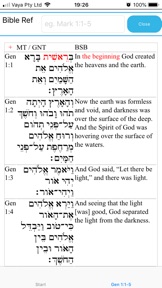
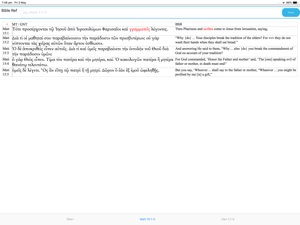
BibleCrawler displays Biblical texts in original languages (fully pointed Hebrew and accented Greek) with linked translations in English.
To use Biblecrawler, type in a Bible verse or verse range into the "Verses" box. For example, type type Rev 1:1-5. You can use the full name of a biblical book, or any of the commonly recognised abbreviations. BibleCrawler expects either a colon or a full stop after a chapter number, if there is going to be a verse or verse range following. The hyphen (minus sign) must be used between the start verse and end verse in a range. Don't worry - if BibleCrawler can't understand your verse reference, a popup box will explain this. Here are examples of valid and invalid verse references
VALID
Genesis 1
Gen 1:1-5
ge 5.5
Gen 5
INVALID
Gen 5:1- (missing an end verse number)
Gen 5:6,1
Gen 5:6.1
Gen 5:6; Gen 6:1
The underlying Hebrew and Greek texts are morphologically analysed, and searches can be based on this data. Searches can also based on an English word or phrase.
When you click on a word in an English translation, it will highlight the corresponding Hebrew or Greek word.
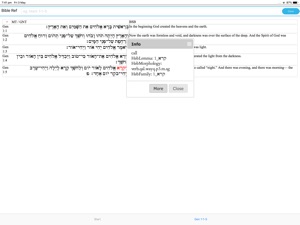
When you click on a Greek or Hebrew word, it will bring up a popup box showing the definition and root word (lemma). This popup has a 'More' button, which will display a full page of information about this word, summarising the way the word is used in the Scriptures. Clicking a down-arrow on this page will display all instances of the word.
BibleCrawler comes with two English-language bible translations - the ESV and BSB. ESV is an abbreviation for the English Standard Version. BSB is an abbreviation for the Berean Study Bible version. BibleCrawler defaults to the ESV. You can change the default Bible on the Settings page. On the same page, you can also nominate other Bibles to display in parallel with the primary bible (the first bible in the list). Word/phrase seaching from the main page of BibleCrawler is always on the primary Bible.
Each new action in BibleCrawler opens up a new tab. The tabs are listed in blue at the bottom of the page. You can close a tab when you are finished with it by clicking on the blue "close" button. You can return to the start page at any time by clicking on the "Start" tab.
BibleCrawler relies on a number of texts that are made available under the terms of various licences.
This publication contains the ESV® Bible (The Holy Bible, English Standard Version®), copyright © 2001 by Crossway Bibles, a publishing ministry of Good News Publishers. ESV Text Edition: 2016. The ESV® text has been reproduced in cooperation with and by permission of Good News Publishers. Unauthorized reproduction of this publication is prohibited. The ESV® Bible (The Holy Bible, English Standard Version®) (ESV) is adapted from the Revised Standard Version of the Bible, copyright Division of Christian Education of the National Council of the Churches of Christ in the U.S.A. All rights reserved. Full ESV permission Notice
The Masoretic Text (Hebrew) in Biblecrawler is dervied from the Translators OT Hebrew Tagged text (TOTHT), which was created by www.STEPBible.org based on work at Tyndale House Cambridge (CC-BY-4.0)
The NT Greek text in BibleCrawler is dervied from the Translators Amalgamated Greek New Testament text (TAGNT), which was created www.STEPBible.org based on work at Tyndale House Cambridge (CC-BY-4.0)
The BSB translation is from The Holy Bible, Berean Study Bible, BSB, Copyright ©2016, 2018 by Bible Hub
Used by Permission. All Rights Reserved Worldwide. www.bereanbible.com
The Lexham English Bible (LEB) (lexhamenglishbible.com) is copyright 2012 by Logos Bible Software. Lexham is a registered trademark of Logos Bible Software. Non-commercial use of the LEB in BibleCrawler is in accordance with this licence - lexhamenglishbible.com/license/
What's New in Version 4.4.7
Improved layout - margins around buttons
Seller
Name
Michael Stead
Information
Developer
Categories
Version
4.4.7
Size
51.1 MB
Game Center
No
VPP Device Licensing
Yes
Rating
Rated: 4+
Compatibility
iOS 12.2 or later
Devices
iPhone 5s, iPhone 6, iPhone 6 Plus, iPhone 6s, iPhone 6s Plus, iPhone SE, iPhone 7, iPhone 7 Plus, iPhone 8, iPhone 8 Plus, iPhone X, iPhone XR, iPhone XS, iPhone XS Max, iPhone 11, iPhone 11 Pro, iPhone 11 Pro Max, iPhone SE (2nd generation), iPhone 12, iPhone 12 Pro, iPhone 12 Pro Max, iPhone 12 mini, iPhone 13, iPhone 13 Pro, iPhone 13 Pro Max, iPhone 13 mini, iPhone SE (3rd generation), iPhone 14, iPhone 14 Plus, iPhone 14 Pro, iPhone 14 Pro Max, iPhone 15, iPhone 15 Plus, iPhone 15 Pro, iPhone 15 Pro Max, iPhone 16, iPhone 16 Plus, iPhone 16 Pro, iPhone 16 Pro Max, iPhone 16e, iPad (5th Generation) Wi-Fi, iPad (5th Generation) Wi-Fi + Cellular, iPad (6th generation) Wi-Fi, iPad (6th generation) Wi-Fi + Cellular, iPad Pro, iPad Pro (Cellular), iPad Pro (9.7-inch), iPad Pro (9.7-inch) (Cellular), iPad Pro 12.9-inch (2nd generation), iPad Pro 12.9-inch (2nd generation) Wi-Fi + Cellular, iPad Pro (10.5-inch), iPad Pro (10.5-inch) Wi-Fi + Cellular, iPad Pro (11-inch), iPad Pro (11-inch) Wi-Fi + Cellular, iPad Pro 12.9-inch (3rd generation), iPad Pro 12.9-inch (3rd generation) Wi-Fi + Cellular, iPad Air, iPad Air (Cellular), iPad Air 2, iPad Air 2 (Cellular), iPad Air (3rd generation), iPad Air (3rd generation) Wi-Fi + Cellular, iPad mini Retina, iPad mini Retina (Cellular), iPad mini 3, iPad mini 3 (Cellular), iPad mini 4, iPad mini 4 (Cellular), iPad mini (5th Generation), iPad mini (5th Generation) Wi-Fi + Cellular, iPad (7th generation) Wi-Fi + Cellular, iPad Pro 11-inch (2nd generation), iPad Pro 11-inch (2nd generation) Wi-Fi + Cellular, iPad Pro 12.9-inch (4th generation), iPad Pro 12.9-inch (4th generation) Wi-Fi + Cellular, iPad Air (4th Generation) (Wi-Fi), iPad Air (4th Generation) (Wi-Fi + Cellular), iPad (8th generation) Wi-Fi, iPad (8th generation) Wi-Fi + Cellular, iPad Pro 11-inch (3rd generation), iPad Pro 11-inch (3rd generation) Wi-Fi + Cellular, iPad Pro 12.9-inch (5th Generation), iPad Pro 12.9-inch (5th Generation) Wi-Fi + Cellular, iPad (9th Generation), iPad (9th Generation) Wi-Fi + Cellular, iPad mini (6th Generation), iPad mini (6th Generation) Wi-Fi + Cellular, iPad Air (5th generation), iPad Air (5th generation) Wi-Fi + Cellular, iPad Pro 11-inch (4th generation), iPad Pro 11-inch (4th generation) Wi-Fi + Cellular, iPad Pro 12.9-inch (6th generation), iPad Pro 12.9-inch (6th generation) Wi-Fi + Cellular, iPad (10th generation), iPad (10th generation) Wi-Fi + Cellular, iPad Air 11-inch (M2) Wi-Fi, iPad Air 13-inch (M2) Wi-Fi, iPad Air 13-inch (M2) Wi-Fi + Cellular, iPad Pro 11-inch (M4) Wi-Fi, iPad Pro 11-inch (M4) Wi-Fi + Cellular, iPad Pro 13-inch (M4) Wi-Fi, iPad Pro 13-inch (M4) Wi-Fi + Cellular, iPad mini (A17 Pro) Wi-Fi, iPad mini (A17 Pro) Wi-Fi + Cellular, iPad (A16) Wi-Fi, iPad (A16) Wi-Fi + Cellular, iPad Air 11-inch (M3) Wi-Fi, iPad Air 11-inch (M3) Wi-Fi + Cellular, iPad Air 13-inch (M3) Wi-Fi, iPad Air 13-inch (M3) Wi-Fi + Cellular, iPod touch (6th Generation), iPod touch (7th generation), Mac Desktop
Languages
App Store: Customer Ratings
Ratings & Reviews
0.0 of 5 (No rating)
App Store: Customer Reviews
No Entry