Updating


iPhone Screenshots




iPad Screenshots


Description
DS Manager Pro allows you to easily supervise your Synology NAS (DSM) by controlling network traffic and connections, system health, storage health and capacity, logs, tasks, backups and many more. There is Wake On LAN and System status widget to help you take control over your NAS even more. Siri shortcuts are supported too.
System info module: System health info. Restart or Shutdown your NAS. Detailed information about your Synology NAS with real time CPU and RAM usage. Easily start / stop installed packages in this module. UPS info such as mode, battery level and estimated battery life.
Network module: Real time network traffic. Connect or disconnect VPN interfaces on your NAS. Connected users list with option to kill each connection. Detailed network interfaces information.
Storage module: List of all your Synology NAS storage pools, volumes and disks with appropriate information. You can perform S.M.A.R.T. test for the selected Disks. External storage list with detailed information about partitions and capacity. Eject external storage option.
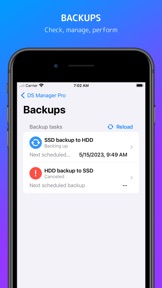
Backups module: List of all Backups with statuses and other details. For each Backup Task you can view versions list and other detailed information. You can start or stop individual Backup Tasks.
Download Station module: List of all Download Station tasks. Create and Edit Download Station tasks. Filter tasks based on its state (running, finished, ...). Perform task actions - Pause, Resume, Delete.
Logs module: Latest logs list with log level color higlighting. Filter logs by its log level to easily identify warnings and errors. Clear all logs action. Easily copy log message to clipboard.
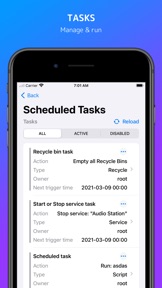
Scheduled tasks module: List of all tasks and events. Filter tasks based on its state (enabled, disabled). You can see "Run results" for selected Tasks. Perform task actions - Enable, Disable, Run, Delete.
Docker containers module: List of all docker containers with image name and up-time. Real time CPU and RAM usage for each individual container. Filter containers based on its state (running, stopped). Perform task actions - Start, Stop, Restart, Force Stop, Clear.
Virtual Machines module: List of all Virtual Machines on your NAS. Check all the information about your Virtual Machines (utilization, network info, storage info, ...). Start, Stop or Force Stop individual Virtual Machines. Filter Virtual Machines based on its state (running, stopped, ...).
Users module: List of all Users and User Groups. Enable, disable, delete or create new User. Adjust User Groups.
More modules and features are coming soon.
Supported Synology DSM: 6.0 and above.
--
Terms of Use: https://fundevs.eu/ds-manager-pro/terms
Privacy Policy: https://fundevs.eu/ds-manager-pro/privacy
What's New in Version 8.2.0
What's new in this version:
- Added ability to force Shutdown / Restart.
- Added new translation - Italian.
- Fixed some issues with login when AMFA is triggered.
- Connect to Server form improved.
- Other improvements and bug fixes.
Seller
Name
EZV, spol. s r.o.
Information
Developer
Categories
Version
8.2.0
Size
27.7 MB
Game Center
No
VPP Device Licensing
Yes
Rating
Rated: 4+
Compatibility
iOS 15.0 or later
Devices
iPhone 5s, iPhone 6, iPhone 6 Plus, iPhone 6s, iPhone 6s Plus, iPhone SE, iPhone 7, iPhone 7 Plus, iPhone 8, iPhone 8 Plus, iPhone X, iPhone XR, iPhone XS, iPhone XS Max, iPhone 11, iPhone 11 Pro, iPhone 11 Pro Max, iPhone SE (2nd generation), iPhone 12, iPhone 12 Pro, iPhone 12 Pro Max, iPhone 12 mini, iPhone 13, iPhone 13 Pro, iPhone 13 Pro Max, iPhone 13 mini, iPhone SE (3rd generation), iPhone 14, iPhone 14 Plus, iPhone 14 Pro, iPhone 14 Pro Max, iPhone 15, iPhone 15 Plus, iPhone 15 Pro, iPhone 15 Pro Max, iPad (5th Generation) Wi-Fi, iPad (5th Generation) Wi-Fi + Cellular, iPad (6th generation) Wi-Fi, iPad (6th generation) Wi-Fi + Cellular, iPad Pro, iPad Pro (Cellular), iPad Pro (9.7-inch), iPad Pro (9.7-inch) (Cellular), iPad Pro 12.9-inch (2nd generation), iPad Pro 12.9-inch (2nd generation) Wi-Fi + Cellular, iPad Pro (10.5-inch), iPad Pro (10.5-inch) Wi-Fi + Cellular, iPad Pro (11-inch), iPad Pro (11-inch) Wi-Fi + Cellular, iPad Pro 12.9-inch (3rd generation), iPad Pro 12.9-inch (3rd generation) Wi-Fi + Cellular, iPad Air, iPad Air (Cellular), iPad Air 2, iPad Air 2 (Cellular), iPad Air (3rd generation), iPad Air (3rd generation) Wi-Fi + Cellular, iPad mini Retina, iPad mini Retina (Cellular), iPad mini 3, iPad mini 3 (Cellular), iPad mini 4, iPad mini 4 (Cellular), iPad mini (5th Generation), iPad mini (5th Generation) Wi-Fi + Cellular, iPad (7th generation) Wi-Fi + Cellular, iPad Pro 11-inch (2nd generation), iPad Pro 11-inch (2nd generation) Wi-Fi + Cellular, iPad Pro 12.9-inch (4th generation), iPad Pro 12.9-inch (4th generation) Wi-Fi + Cellular, iPad Air (4th Generation) (Wi-Fi), iPad Air (4th Generation) (Wi-Fi + Cellular), iPad (8th generation) Wi-Fi, iPad (8th generation) Wi-Fi + Cellular, iPad Pro 11-inch (3rd generation), iPad Pro 11-inch (3rd generation) Wi-Fi + Cellular, iPad Pro 12.9-inch (5th Generation), iPad Pro 12.9-inch (5th Generation) Wi-Fi + Cellular, iPad (9th Generation), iPad (9th Generation) Wi-Fi + Cellular, iPad mini (6th Generation), iPad mini (6th Generation) Wi-Fi + Cellular, iPad Air (5th generation), iPad Air (5th generation) Wi-Fi + Cellular, iPad Pro 11-inch (4th generation), iPad Pro 11-inch (4th generation) Wi-Fi + Cellular, iPad Pro 12.9-inch (6th generation), iPad Pro 12.9-inch (6th generation) Wi-Fi + Cellular, iPad (10th generation), iPad (10th generation) Wi-Fi + Cellular, iPod touch (6th Generation), iPod touch (7th generation), Mac Desktop
Languages
English, Catalan, Chinese, Danish, Dutch, French, German, Italian, Korean, Russian, Slovak, Spanish
App Store: Customer Ratings
Ratings & Reviews
0.0 of 5 (No rating)
App Store: Customer Reviews
No Entry