Updating


iPhone Screenshots



Description
MFA Authenticator App – Your Complete Security Solution
Enhance your online security with MFA Authenticator App, a simple yet powerful tool for protecting your accounts. Manage your two-factor authentication (2FA) codes and passwords effortlessly, and add an extra layer of security to over 1,000 apps.
KEY FEATURES:
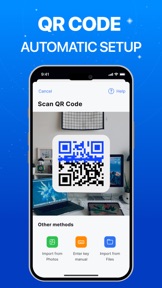
1. Easy Setup with QR Code
Setting up multi-factor authentication has never been easier. Just scan a QR code to secure your account with time-sensitive, encrypted codes.
2. Protect Over 1,000 Apps
Protect all your favorite apps with MFA Authenticator App. Seamlessly integrate 2FA with apps like Gmail, Facebook, Instagram, PayPal, and more. Keep all your accounts safe in one place.
3. Secure Cloud Backup
Never lose access to your accounts again. Safeguard your authentication data with encrypted cloud backups, so you never lose access to your accounts.
4. Password Leak Detection
Be notified if any of your passwords have been compromised online. When you set a password on any website, the app checks for data breaches to keep you safe.
5. Biometrics for Extra Protection
Lock your authentication data with Face ID, Touch ID, or a unique password, ensuring only you can access it, even if someone else has your device.
6. Organize Accounts with Folders
Managing multiple accounts with two-factor authentication can get overwhelming. Easily manage multiple accounts by organizing them into folders for faster, stress-free access.
NEW UPDATE FEATURES:
* Autofill: The Autofill feature in the Authenticator App simplifies your online experience by securely managing and auto-completing login credentials. Autofill automatically fills in your usernames, passwords, and 2FA codes when accessing websites or apps, saving you time and effort.
ADVANCED FEATURES:
- Quick Access with Widgets: Add the app to your widget for instant access to your 2FA codes without needing to open the app.
- Password Manager: Store and manage all your passwords securely in one place.
- Private Browsing: Keep your online activity safe with built-in private browsing.
- Wi-Fi Security Scanner: Detect risky networks and protect your data from online threats.
More Than a 2FA App!
MFA Authenticator App offers seamless 2FA management, privacy tools, and security features to give you complete control over your online safety. Download today for ultimate peace of mind!
Subscription Pricing & Terms:
* Payment is charged to your iTunes account upon purchase confirmation.
* Manage subscriptions and turn off auto-renewal in Account Settings.
* Subscriptions auto-renew unless canceled 24 hours before the end of the current period, with renewal charged 24 hours prior.
* Canceled subscriptions remain active until the period ends; no refunds are issued.
* Unused portions of free trials are forfeited upon subscription purchase.
For support, contact us at: contact.matechmobile@gmail.com
Terms of service: https://matechmobile.org/infor/term.html
Privacy policy: https://matechmobile.org/infor/privacy.html
What's New in Version 1.9
Introducing Autofill Passwords! Securely save and auto-fill your logins for faster access.
Seller
Name
MATECHMOBILE SOFTWARE JOINT STOCK COMPANY
Information
Developer
Categories
Version
1.9
Size
162.3 MB
Game Center
No
VPP Device Licensing
Yes
Rating
Rated 17+ for the following:
Unrestricted Web Access
Compatibility
iOS 14.0 or later
Devices
iPhone 5s, iPhone 6, iPhone 6 Plus, iPhone 6s, iPhone 6s Plus, iPhone SE, iPhone 7, iPhone 7 Plus, iPhone 8, iPhone 8 Plus, iPhone X, iPhone XR, iPhone XS, iPhone XS Max, iPhone 11, iPhone 11 Pro, iPhone 11 Pro Max, iPhone SE (2nd generation), iPhone 12, iPhone 12 Pro, iPhone 12 Pro Max, iPhone 12 mini, iPhone 13, iPhone 13 Pro, iPhone 13 Pro Max, iPhone 13 mini, iPhone SE (3rd generation), iPhone 14, iPhone 14 Plus, iPhone 14 Pro, iPhone 14 Pro Max, iPhone 15, iPhone 15 Plus, iPhone 15 Pro, iPhone 15 Pro Max, iPhone 16, iPhone 16Plus, iPhone 16Pro, iPhone 16ProMax, iPad (5th Generation) Wi-Fi, iPad (5th Generation) Wi-Fi + Cellular, iPad (6th generation) Wi-Fi, iPad (6th generation) Wi-Fi + Cellular, iPad Pro, iPad Pro (Cellular), iPad Pro (9.7-inch), iPad Pro (9.7-inch) (Cellular), iPad Pro 12.9-inch (2nd generation), iPad Pro 12.9-inch (2nd generation) Wi-Fi + Cellular, iPad Pro (10.5-inch), iPad Pro (10.5-inch) Wi-Fi + Cellular, iPad Pro (11-inch), iPad Pro (11-inch) Wi-Fi + Cellular, iPad Pro 12.9-inch (3rd generation), iPad Pro 12.9-inch (3rd generation) Wi-Fi + Cellular, iPad Air, iPad Air (Cellular), iPad Air 2, iPad Air 2 (Cellular), iPad Air (3rd generation), iPad Air (3rd generation) Wi-Fi + Cellular, iPad mini Retina, iPad mini Retina (Cellular), iPad mini 3, iPad mini 3 (Cellular), iPad mini 4, iPad mini 4 (Cellular), iPad mini (5th Generation), iPad mini (5th Generation) Wi-Fi + Cellular, iPad (7th generation) Wi-Fi + Cellular, iPad Pro 11-inch (2nd generation), iPad Pro 11-inch (2nd generation) Wi-Fi + Cellular, iPad Pro 12.9-inch (4th generation), iPad Pro 12.9-inch (4th generation) Wi-Fi + Cellular, iPad Air (4th Generation) (Wi-Fi), iPad Air (4th Generation) (Wi-Fi + Cellular), iPad (8th generation) Wi-Fi, iPad (8th generation) Wi-Fi + Cellular, iPad Pro 11-inch (3rd generation), iPad Pro 11-inch (3rd generation) Wi-Fi + Cellular, iPad Pro 12.9-inch (5th Generation), iPad Pro 12.9-inch (5th Generation) Wi-Fi + Cellular, iPad (9th Generation), iPad (9th Generation) Wi-Fi + Cellular, iPad mini (6th Generation), iPad mini (6th Generation) Wi-Fi + Cellular, iPad Air (5th generation), iPad Air (5th generation) Wi-Fi + Cellular, iPad Pro 11-inch (4th generation), iPad Pro 11-inch (4th generation) Wi-Fi + Cellular, iPad Pro 12.9-inch (6th generation), iPad Pro 12.9-inch (6th generation) Wi-Fi + Cellular, iPad (10th generation), iPad (10th generation) Wi-Fi + Cellular, iPad Air 11-inch (M2) Wi-Fi, iPad Air 13-inch (M2) Wi-Fi, iPad Air 13-inch (M2) Wi-Fi + Cellular, iPad Pro 11-inch (M4) Wi-Fi, iPad Pro 11-inch (M4) Wi-Fi + Cellular, iPad Pro 13-inch (M4) Wi-Fi, iPad Pro 13-inch (M4) Wi-Fi + Cellular, iPad MiniA17Pro, iPad MiniA17ProCellular, iPod touch (6th Generation), iPod touch (7th generation), Apple Watch Series 4
Languages
English, Afrikaans, Chinese, French, German, Hindi, Indonesian, Japanese, Portuguese, Spanish, Thai
App Store: Customer Ratings
Ratings & Reviews
0.0 of 5 (No rating)
App Store: Customer Reviews
No Entry