AboutTermsPrivacyContact
 
Updating
GPS Odometer Pro

GPS Odometer Pro

Released: 2015-01-16
© 2022 Kevin WIllett
GPS Odometer Pro - QR Code
Version 2.12
4+
Download on the App Store
Version 2.12
4+
Download on the App Store
Released: 2015-01-16
© 2022 Kevin WIllett

iPhone Screenshots

Screenshot
Screenshot
Screenshot
Screenshot
Screenshot

iPad Screenshots

Screenshot
Screenshot
Screenshot
Screenshot
Screenshot

Description

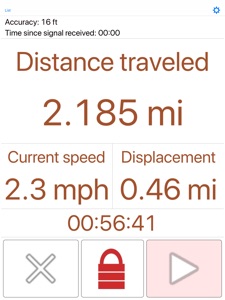
A simple and easy to use odometer. GPS Odometer only does one thing, and does it well: measure distance traveled. Includes run in background capability. Ideal for almost anything that requires measuring outdoor distance traveled such as walking, running, driving, boating, or hiking. Note that GPS does not work well under a roof. For best results, use outdoors.
Benefits of the paid version:
- Landscape and splitscreen support.
- Ability to have multiple trips. Each trip can be stopped and started independently.
- Receive notifications while the application is closed at distance intervals of your choosing.
- Custom units readout. For example, you want to know how many calories you have burned. You can customize this to include anything that has a linear relationship with distance traveled. This can be different for each trip.
- No advertisements.
- Export trips via email and optionally restore later.
Displays:
- Distance
- Time elapsed
- Speed (average or current)
- Displacement (straight line distance from your starting point) This can be hidden.
Distance units include:
- Kilometers
- Miles
- Nautical miles
- Meters
- Feet
Speed units include:
- Kilometers per hour
- Miles per hour
- Nautical miles per hour
- Meters per second
- Feet per second
Other features:
- Large font adjustable display.
- Accurate to within 1 percent when compared to most car odometers under normal driving conditions.
- Includes a lock to help prevent accidental reset of your trip. After unlocked, it locks back in a few seconds, or you can lock it yourself.
- Approximates distance traveled in some GPS dead spots such as driving through a tunnel by adding the as-a-bird flies distance to your trip.
Please also note:
- GPS Odometer does run in the background if you leave it running. Be sure to pause the trip when you are finished or battery life will be negatively affected. The timer stops when the trip is paused.
- To change the display, tap the unlock button and notice the three green boxes that temporarily appear. Each button adjusts a different part of the display.
- You can change the language to English in the application settings.
Please visit the web page for more details.

What's New in Version 2.12

- Trips now have 'notes' and 'starting distance' properties.
- Added a customizable Widget.
- Notifications can now be customized.
- Removed the light/dark theme setting. Device level light/dark appearance introduced in iOS 14 makes this redundant.
- New trips are created via 'templates' instead of the 'Trip name to auto increment' setting
- Please see the support page for more details.
Please send crash reports if crashes occur.
Please contact the developer via email if you have questions or notice any errors or issues.

Seller

Name

Kevin Willett

URL

Information

Developer

Categories

Version

2.12

Size

20 MB

Game Center

No

VPP Device Licensing

Yes

Rating

Rated: 4+

Compatibility

iOS 9.0 or later

Devices

iPhone 4S, iPhone 5, iPhone 5c, iPhone 5s, iPhone 6, iPhone 6 Plus, iPhone 6s, iPhone 6s Plus, iPhone SE, iPhone 7, iPhone 7 Plus, iPhone 8, iPhone 8 Plus, iPhone X, iPhone XR, iPhone XS, iPhone XS Max, iPhone 11, iPhone 11 Pro, iPhone 11 Pro Max, iPhone SE (2nd generation), iPhone 12, iPhone 12 Pro, iPhone 12 Pro Max, iPhone 12 mini, iPhone 13, iPhone 13 Pro, iPhone 13 Pro Max, iPhone 13 mini, iPhone SE (3rd generation), iPhone 14, iPhone 14 Plus, iPhone 14 Pro, iPhone 14 Pro Max, iPhone 15, iPhone 15 Plus, iPhone 15 Pro, iPhone 15 Pro Max, iPad 2 (3G), iPad (3rd Generation) (4G), iPad (4th Generation) (4G), iPad (5th Generation) Wi-Fi + Cellular, iPad (6th generation) Wi-Fi + Cellular, iPad Pro (Cellular), iPad Pro (9.7-inch) (Cellular), iPad Pro 12.9-inch (2nd generation) Wi-Fi + Cellular, iPad Pro (10.5-inch) Wi-Fi + Cellular, iPad Pro (11-inch) Wi-Fi + Cellular, iPad Pro 12.9-inch (3rd generation) Wi-Fi + Cellular, iPad Air (Cellular), iPad Air 2 (Cellular), iPad Air (3rd generation) Wi-Fi + Cellular, iPad mini (4G), iPad mini Retina (Cellular), iPad mini 3 (Cellular), iPad mini 4 (Cellular), iPad mini (5th Generation) Wi-Fi + Cellular, iPad (7th generation) Wi-Fi + Cellular, iPad Pro 11-inch (2nd generation) Wi-Fi + Cellular, iPad Pro 12.9-inch (4th generation) Wi-Fi + Cellular, iPad Air (4th Generation) (Wi-Fi + Cellular), iPad (8th generation) Wi-Fi + Cellular, iPad Pro 11-inch (3rd generation) Wi-Fi + Cellular, iPad Pro 12.9-inch (5th Generation) Wi-Fi + Cellular, iPad (9th Generation) Wi-Fi + Cellular, iPad mini (6th Generation) Wi-Fi + Cellular, iPad Air (5th generation) Wi-Fi + Cellular, iPad Pro 11-inch (4th generation) Wi-Fi + Cellular, iPad Pro 12.9-inch (6th generation) Wi-Fi + Cellular, iPad (10th generation) Wi-Fi + Cellular

Languages

English, Chinese, French, German, Italian, Japanese, Korean, Portuguese, Russian, Spanish, Vietnamese

App Store: Customer Ratings

Ratings & Reviews

5.0 of 5 (1 Rating)

App Store: Customer Reviews

2018-09-24

Very good for walking, easy to read after. The lock is useful well done thank your

Read above
gerry d lim
Version 2.8