AboutTermsPrivacyContact
 
Updating
Open GPX Tracker

Open GPX Tracker

Released: 2015-05-05
© (c) Juan M. Merlos & Contributors 2015-2023
Open GPX Tracker - QR Code
Version 1.9.0
4+
Download on the App Store
Version 1.9.0
4+
Download on the App Store
Released: 2015-05-05
© (c) Juan M. Merlos & Contributors 2015-2023

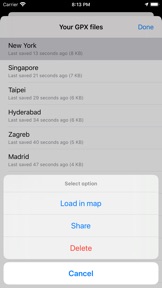
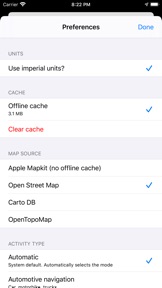
iPhone Screenshots

Screenshot
Screenshot
Screenshot
Screenshot
Screenshot
Screenshot
Screenshot

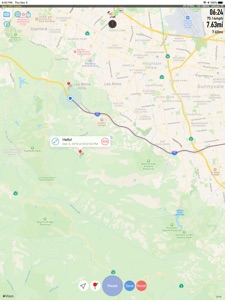
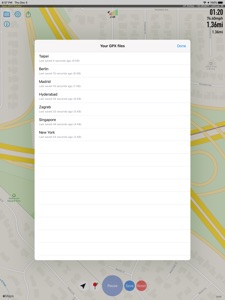
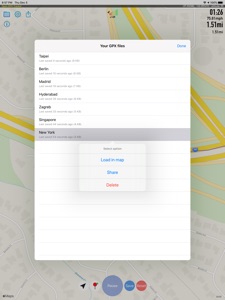
iPad Screenshots

Screenshot
Screenshot
Screenshot
Screenshot
Screenshot
Screenshot

Description

Create GPS traces with waypoints. Offline map support, no time restrictions, no ads, no in-app-purchases, and all the data is private.
Open GPX Tracker is ideal for:
* Traveling and vacation (offline map app)
* Collecting and sharing track and waypoints data.
* Use it as your Camera GPS companion.
* Keeping track of your hiking explorations and bike routes.
* Creating routes and waypoints for editing Open Street Map.
* Publishing Open Street Map Traces.
* Creating real GPX files for testing your iOS apps in Xcode.
Main Features:
* Apple Watch App support
* Offline maps of browsed areas
* Load saved sessions and continue tracking
* Auto recovery last session after crash or closing the app
* Display tracking information in a map
* Display speed, distance, coordinates and time
* Use multiple map sources (Apple Maps, Open Street Maps, CartoDB, OpenTopoMaps, OpenSeaMaps)
* Pause / Resume tracking
* Add waypoint to user location
* Add waypoint to any place in the map with a long press
* Edit waypoint name
* Drag & Drop waypoint pin
* Remove waypoints
* Share and send GPX files
* Custom file naming
All the tracked data is kept 100% private in your phone. No data is collected (Indeed, I don't want it at all). For all the details, please check the privacy policy link.
Please note:
Continued use of GPS running in the background can dramatically decrease battery life.

What's New in Version 1.9.0

* Added new option for selecting custom output folder by @leonspok
* Added OpenSeaMap tile server
* Auto recover last track instead of prompting a question upon launching the app
.
Also, updated the privacy policy to clarify that the tracking data is kept in your phone. Check it out.
## New Contributors
* @dillona's first contribution
* @leonspok's first contribution
Open GPX Tracker is an open-source and free-to-use app. If you like it, please leave a review sharing how it has been useful to you.

Information

Categories

Version

1.9.0

Size

32.8 MB

Game Center

No

VPP Device Licensing

Yes

Rating

Rated: 4+

Compatibility

iOS 12.0 or later

Devices

iPhone 5s, iPhone 6, iPhone 6 Plus, iPhone 6s, iPhone 6s Plus, iPhone SE, iPhone 7, iPhone 7 Plus, iPhone 8, iPhone 8 Plus, iPhone X, iPhone XR, iPhone XS, iPhone XS Max, iPhone 11, iPhone 11 Pro, iPhone 11 Pro Max, iPhone SE (2nd generation), iPhone 12, iPhone 12 Pro, iPhone 12 Pro Max, iPhone 12 mini, iPhone 13, iPhone 13 Pro, iPhone 13 Pro Max, iPhone 13 mini, iPhone SE (3rd generation), iPhone 14, iPhone 14 Plus, iPhone 14 Pro, iPhone 14 Pro Max, iPhone 15, iPhone 15 Plus, iPhone 15 Pro, iPhone 15 Pro Max, iPad (5th Generation) Wi-Fi, iPad (5th Generation) Wi-Fi + Cellular, iPad (6th generation) Wi-Fi, iPad (6th generation) Wi-Fi + Cellular, iPad Pro, iPad Pro (Cellular), iPad Pro (9.7-inch), iPad Pro (9.7-inch) (Cellular), iPad Pro 12.9-inch (2nd generation), iPad Pro 12.9-inch (2nd generation) Wi-Fi + Cellular, iPad Pro (10.5-inch), iPad Pro (10.5-inch) Wi-Fi + Cellular, iPad Pro (11-inch), iPad Pro (11-inch) Wi-Fi + Cellular, iPad Pro 12.9-inch (3rd generation), iPad Pro 12.9-inch (3rd generation) Wi-Fi + Cellular, iPad Air, iPad Air (Cellular), iPad Air 2, iPad Air 2 (Cellular), iPad Air (3rd generation), iPad Air (3rd generation) Wi-Fi + Cellular, iPad mini Retina, iPad mini Retina (Cellular), iPad mini 3, iPad mini 3 (Cellular), iPad mini 4, iPad mini 4 (Cellular), iPad mini (5th Generation), iPad mini (5th Generation) Wi-Fi + Cellular, iPad (7th generation) Wi-Fi + Cellular, iPad Pro 11-inch (2nd generation), iPad Pro 11-inch (2nd generation) Wi-Fi + Cellular, iPad Pro 12.9-inch (4th generation), iPad Pro 12.9-inch (4th generation) Wi-Fi + Cellular, iPad Air (4th Generation) (Wi-Fi), iPad Air (4th Generation) (Wi-Fi + Cellular), iPad (8th generation) Wi-Fi, iPad (8th generation) Wi-Fi + Cellular, iPad Pro 11-inch (3rd generation), iPad Pro 11-inch (3rd generation) Wi-Fi + Cellular, iPad Pro 12.9-inch (5th Generation), iPad Pro 12.9-inch (5th Generation) Wi-Fi + Cellular, iPad (9th Generation), iPad (9th Generation) Wi-Fi + Cellular, iPad mini (6th Generation), iPad mini (6th Generation) Wi-Fi + Cellular, iPad Air (5th generation), iPad Air (5th generation) Wi-Fi + Cellular, iPad Pro 11-inch (4th generation), iPad Pro 11-inch (4th generation) Wi-Fi + Cellular, iPad Pro 12.9-inch (6th generation), iPad Pro 12.9-inch (6th generation) Wi-Fi + Cellular, iPad (10th generation), iPad (10th generation) Wi-Fi + Cellular, iPod touch (6th Generation), iPod touch (7th generation), Apple Watch Series 4

Languages

English, Chinese, Dutch, Finnish, French, German, Italian, Portuguese, Russian, Spanish, Ukrainian

App Store: Customer Ratings

Ratings & Reviews

5.0 of 5 (1 Rating)

App Store: Customer Reviews

2023-05-24

GPS position

I am a seaman and I compare the position with the ships equipment frequently.
It is very accurate.
BUT. Now I bought a new iPhone which has that extremely annoying floating island on the top of the screen and which cannot be hidden or removed.
And now the GPS position which is also in the top of the screen obscured. And thus the app is useless.
Is there any chance to move the information what we need to another position please.
And if an apple phone developer sees this post
Man please get rid of that black pil on the screen or at least let us choose to either see it or not see it. Thank you!
fryskepaddy
Version 1.8.0