Updating


Re
#75 in Top Free iPad Apps > Business
iPhone Screenshots

iPad Screenshots



Description
Mobile HelpDesk, Work Orders, 2D and 3D drawings and Asset Management for FM-organizations.
Work Orders and Preventive Maintenance:
--------------------------------------------------------------------
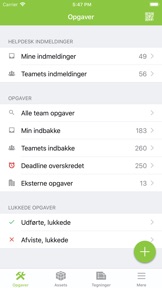
All work orders and helpdesk tickets can be handles 100% on mobile or tablet by technicians and service personnel, or by external suppliers.
Simple overview and handling of incoming helpdesk tickets and work orders in the team.
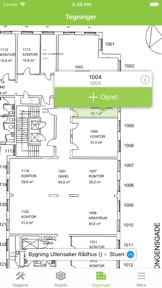
Create work orders with photos, details and placement on 2D and 3D drawings on the spot - even offline.
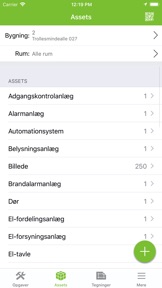
Assets / technical equipment
-----------------------------------------------
Search for assets and documentation (PDF's) in a building or on 2D or 3D drawings/BIM-models.
Assets can be created on the spot with photos and product data.
Use QR-codes for easy access to asset data.
2D/3D drawings/BIM and Space Management
-------------------------------------------------------------------------
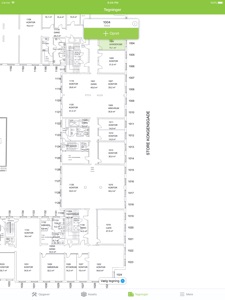
Easy access to all level drawings and BIM models in the field using DaluxFM app.
Edit room data e.g. room number, room type, users and other custom fields with the DaluxFM app
DaluxFM app at-a-glance:
-----------------------------------------
- HelpDesk tickets
- Work Orders
- Photos with annotation
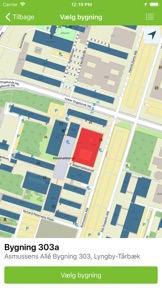
- Work Orders can be placed on GPS, 2D or 3D drawings/BIM-models
- Offline use (helpdesk, work orders, assets)
- Complete history for each work order
- Complete asset documentation lookup and mobile registering
- QR-codes for fast lookup of assets or closing work orders
- External suppliers can use DaluxFM to close their work orders
- See and edit room data directly on floor plans
What's New in Version 4.2.9
• Can link to existing work orders
• Redesigned pages: work order, ticket, asset, room, and other report pages
• New asset card with embedded checklist status on Work Order page
• Introduced new location card
• New Room QR-dashboard and enhanced Asset QR-dashboard
• Quick actions for tickets introduced
• New default values supported in work orders and tickets
• Hierarchical viewing enabled for layer fields
• Color-coded priority selection when filtering
• Bug fixes and stability improvements
Information
Developer
Categories
Version
4.2.9
Size
116.5 MB
Game Center
No
VPP Device Licensing
Yes
Rating
Rated: 4+
Compatibility
iOS 11.4 or later
Devices
iPhone 5s, iPhone 6, iPhone 6 Plus, iPhone 6s, iPhone 6s Plus, iPhone SE, iPhone 7, iPhone 7 Plus, iPhone 8, iPhone 8 Plus, iPhone X, iPhone XR, iPhone XS, iPhone XS Max, iPhone 11, iPhone 11 Pro, iPhone 11 Pro Max, iPhone SE (2nd generation), iPhone 12, iPhone 12 Pro, iPhone 12 Pro Max, iPhone 12 mini, iPhone 13, iPhone 13 Pro, iPhone 13 Pro Max, iPhone 13 mini, iPhone SE (3rd generation), iPhone 14, iPhone 14 Plus, iPhone 14 Pro, iPhone 14 Pro Max, iPhone 15, iPhone 15 Plus, iPhone 15 Pro, iPhone 15 Pro Max, iPad (5th Generation) Wi-Fi, iPad (5th Generation) Wi-Fi + Cellular, iPad (6th generation) Wi-Fi, iPad (6th generation) Wi-Fi + Cellular, iPad Pro, iPad Pro (Cellular), iPad Pro (9.7-inch), iPad Pro (9.7-inch) (Cellular), iPad Pro 12.9-inch (2nd generation), iPad Pro 12.9-inch (2nd generation) Wi-Fi + Cellular, iPad Pro (10.5-inch), iPad Pro (10.5-inch) Wi-Fi + Cellular, iPad Pro (11-inch), iPad Pro (11-inch) Wi-Fi + Cellular, iPad Pro 12.9-inch (3rd generation), iPad Pro 12.9-inch (3rd generation) Wi-Fi + Cellular, iPad Air, iPad Air (Cellular), iPad Air 2, iPad Air 2 (Cellular), iPad Air (3rd generation), iPad Air (3rd generation) Wi-Fi + Cellular, iPad mini Retina, iPad mini Retina (Cellular), iPad mini 3, iPad mini 3 (Cellular), iPad mini 4, iPad mini 4 (Cellular), iPad mini (5th Generation), iPad mini (5th Generation) Wi-Fi + Cellular, iPad (7th generation) Wi-Fi + Cellular, iPad Pro 11-inch (2nd generation), iPad Pro 11-inch (2nd generation) Wi-Fi + Cellular, iPad Pro 12.9-inch (4th generation), iPad Pro 12.9-inch (4th generation) Wi-Fi + Cellular, iPad Air (4th Generation) (Wi-Fi), iPad Air (4th Generation) (Wi-Fi + Cellular), iPad (8th generation) Wi-Fi, iPad (8th generation) Wi-Fi + Cellular, iPad Pro 11-inch (3rd generation), iPad Pro 11-inch (3rd generation) Wi-Fi + Cellular, iPad Pro 12.9-inch (5th Generation), iPad Pro 12.9-inch (5th Generation) Wi-Fi + Cellular, iPad (9th Generation), iPad (9th Generation) Wi-Fi + Cellular, iPad mini (6th Generation), iPad mini (6th Generation) Wi-Fi + Cellular, iPad Air (5th generation), iPad Air (5th generation) Wi-Fi + Cellular, iPad Pro 11-inch (4th generation), iPad Pro 11-inch (4th generation) Wi-Fi + Cellular, iPad Pro 12.9-inch (6th generation), iPad Pro 12.9-inch (6th generation) Wi-Fi + Cellular, iPad (10th generation), iPad (10th generation) Wi-Fi + Cellular, iPod touch (6th Generation), iPod touch (7th generation)
Languages
App Store: Customer Ratings
Ratings & Reviews
0.0 of 5 (No rating)
App Store: Customer Reviews
No Entry